
What is Navigate?
Navigate is a Student Success Management System for higher education that helps schools proactively manage student success and retention.

Download the App (coming soon)
App Store
Google Play
Navigate Features
- Different meeting types to choose from (phone, virtual, or in-person)
- Review meeting notes left by faculty and staff
- View your grades
- Send and receive emails
- View your class schedule
- Receive 4-week progress reports
- View midterm grades
- Student mobile app (coming soon)
- Find and join a study group (coming soon)
Transcript
All right, in this video I’m going to show you some of the basics and just a little bit about Navigate.
So to get to Navigate I go to the link tree, which if you don’t have saved you definitely should, because it’s got a lot of important links and information on it. But I’m going to scroll down until I get to Login to Navigate.
And I just logged in so it’s not going to make me log in. But when you log in it’s going to be your last name, your numbers, and then your password.
In the front you’re going to have all your classes and then over here on the side you’re going to have your teachers and their email for you.
And then if you go to this Reports button over here — you don’t need much on this page — but this section right here is where you see your meeting reports. So you click this little blue button right here and then it’ll pop up the report from your meeting if you have any meetings on here.
Then you click Calendar and Calendar shows you your classes and what’s going on on your schedule. So all my classes are blue and then I have — I made a meeting on Navigate with the Writing Lab at two on Friday. So that’s where I’ll be. But you can just click on them and they give you more information and things like that.
The other important button is this blue one over here, so click Make an Appointment. So this is how you make an appointment on Navigate. I’m going to pick something random but it’s going to be an example of how to make an appointment.
So when it loads you’re going to first select this one — what area of campus would you like to meet with. Let’s say I’m going to pretend I need another Writing Lab session, so I’m going to say Tutoring. And then I’m going to scroll all the way down to the bottom — but there are all these options for you in case you want something different, and they’re all going to be different, so there’s a lot of different options for setting meetings on here — and I’m going to click Writing Center.
And I don’t want it for this week but I want it the day before my paper is due, so the 8th. And so I click Find Available Times and then it loads and then I can pick whatever time I want. So all these bubbles are available times for the 8th, so I can click any of these. I can also click a different day.
And then since there’s six people available in the Writing Center I can pick a specific person. So if I wanted this AP person I can click it — Allison — but that means that she’s only available for one of the bubbles for the 9th. If I want to get it on the 9th — which I actually wanted on the 8th — so she probably wouldn’t be my choice, but it’s okay. But I’m going to pick 1:30 to 2 on the 8th.
So then you’re going to have this stuff up here and this is going to be a little more information, and then when you scroll down there’s going to be a button down there that’s going to say Confirm Appointment. And then you’ll click that and you’ll get an email. It’ll pop up in your calendar when you go to the calendar so you’ll know about it in advance and you can see it.
But yes, those are all the fancy buttons on Navigate. I hope this video was helpful.
Questions?
Contact navigate@avila.edu for questions or help
You can also visit the Navigate Help Center for step-by-step instructions and articles on best practices.
Student Guides
How to set up a tutoring, advising, or success appointment, and other features
Navigate Training Presentation
Navigate Student Training (20 minutes)
Set Up a Tutoring Appointment
Transcript
Hi there, so we’re going to talk about how to schedule a tutoring appointment in Navigate.
So what you’re going to do is go to the Avila homepage, go over here to Quick Links, click on Current Students, scroll down, and choose Navigate. And then it will have you log in with your username and password — so that’s going to be your same credentials that you use for Canvas, MyAU, and Outlook. But I’m already logged in as Don the Eagle, the student.
So you’re going to click over here to Make an Appointment.
What type of appointment would you like to schedule? So Academic Success and Tutoring. And then once you click there you can choose a meeting topic, which is the type of tutoring session that you’re looking for. So there’s Academic Coaching, Art and Design, Math Tutoring, Science Tutoring, and then Writing Tutoring. And then there’s more that will be added as we are hiring tutors in our new Academic Success and Tutoring Services office right now, so more classes will be added.
So let’s say you want to do College Algebra. Let’s choose tomorrow. Find Available Times.
So here it’s showing you Madeline is in the library to do College Algebra tutoring. And here are the dates — so she wasn’t available for Friday but she is available next Tuesday at these times and then a few times after that.
And then so once we do have more tutors available it will show more than one person and you’re able to choose a different person down here.
You can choose how you want to meet, so let’s say you only want to meet virtually for College Algebra tutoring. So then those times — which they happen to be the same for Madeline, but if they were different times that she was offering in person or virtual then it would show different days and times here.
And then tutoring is only offered in the library so that’s the only location you can choose. And then we don’t have a setup where you have to choose a certain course in order to do tutoring, you just have to choose the subject that you want.
So that is how you log into Navigate and choose a tutoring appointment. And then if you need to go back to the beginning you can choose Start Over and then search for the other types of tutoring appointments that you are needing. But that’s where you find it.
How to Find Meeting Notes
Transcript
Hi, this video is going to show you how to get to your appointment reports in Navigate.
So to get to Navigate I like to go to avila.edu, then I click this button over here, click this button down here, and click Current Student.
Then I’m going to scroll down a little bit until I get to Navigate and click it.
Then Navigate is going to pull up for you. I was just on here a minute ago so it didn’t make me log in, but you will be logging in with your Avila username and password.
Then you go to Reports instead of class information, and then you’re going to scroll down until you see Appointment Summaries for and then whatever your name is.
Then you’re going to click this little blue button over here, and so you click it, and your appointment summary is going to come up right here. This is my appointment summary for my meeting I had with Paige Elon.
And yeah, that’s how you get your appointment summaries.
Set Up an Appointment with Faculty/Staff
Transcript
All right, hi everyone. We’re going to do a short video to show you how to set up a meeting with someone through the Navigate system.
So you’re going to go to the Avila homepage, go to Quick Links, click on Current Students, scroll down and it should be one of your big four options up here. This will take you to the Navigate home page. It will ask you to log in with your Avila username and password. You’re going to click Login and it’ll take you to your home page.
Once you’re logged in you’ll see your home page. I’m impersonating Dom the Eagle and we’re going to go over here and click Make an Appointment.
After you click Make an Appointment you’re going to see this page here to show you different options on where you would like to schedule the appointment and what type of appointment you would like to schedule. So let’s say you’re going to choose an advising appointment. The meeting topic that you want to do is Academic Success Planning. Let’s ask for a meeting for tomorrow and then you’re going to choose Find Available Time.
Now this will show you two people that have availability — Maya Atonement and then Paige Elem. So you can see both of their combined availabilities so you can choose a meeting. So let’s say you want to do Thursday at 11 a.m. That’s going to be with Maya and you’ll be able to see the time, the date, your meeting topic, the location of the meeting, who it is, Maya’s Zoom personal information, and then her phone number.
You can choose how you would like to meet — that can be in person, over the phone, or virtually. So let’s choose in person. And then if you wanted to add something you could say, you know, just needing help with goal setting.
And then an email reminder will be sent to your email and a text message reminder will be sent to your phone number, and you can type in your phone number right down here. And then you hit Schedule. And then once you hit Schedule that meeting will be placed onto your calendar and on Maya’s calendar so that way both of you can remember that you have a meeting set up.
So that is how you go into Navigate and schedule an appointment with someone.
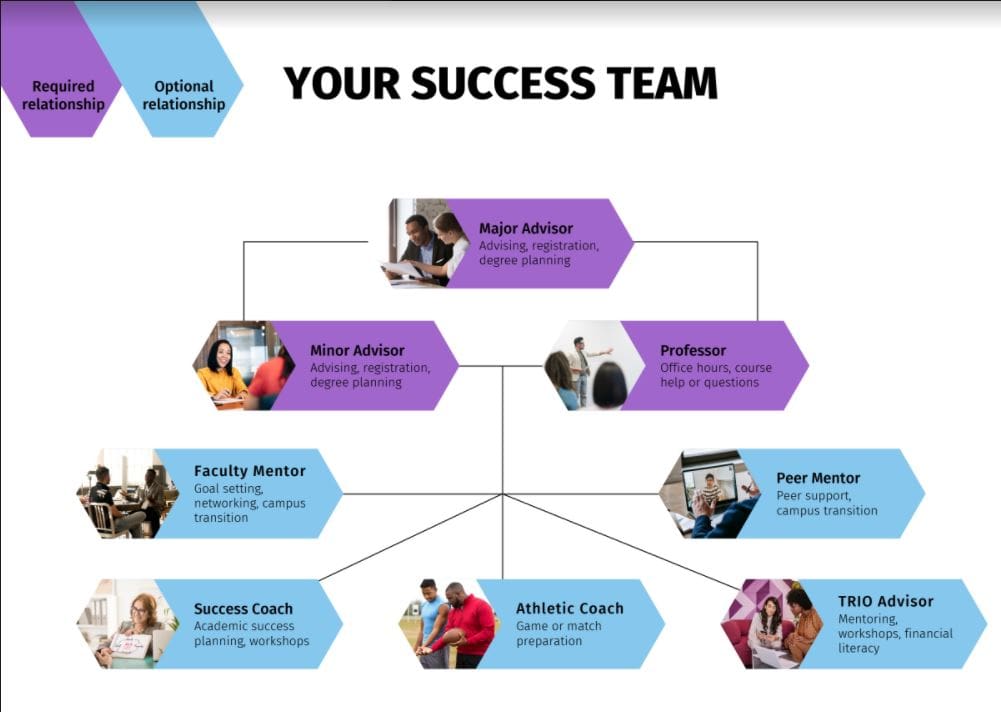
Who is on your Student Success Team?
Transcrpt
Hi there, so we are going to talk about what your success team means in Navigate and who are the people on your success team.
So as a student, every student on campus has a success team. There are several different people on campus that you can check in with and they’re going to be there to help you along the way throughout your time here at Avila.
So the first of those people are going to be your major advisor. That person is there to help you with advising, with registration, with planning out your degree over the next four or five years that you’re here at Avila — or if you’re a junior or senior, the next one or two years depending on where you are. That person is here to help you with figuring everything out that has to do with your major. They can also talk with you about internships if that’s required, graduation requirements, anything like that that’s super important related to your major.
The next important person is going to be your minor advisor. So you would only have a minor advisor if you have a minor, which I would definitely highly recommend because I know there’s some time in your schedule you need to fill in with some credit hours and a minor would be a great way to do that. That person can pretty much help you with the same things that your major advisor would help you with, but only pertaining to your minor in whichever minor that you’ve chosen — so the advising, the registration process, planning out when you’re going to take your classes, when you’re going to complete your minor. That would be what that person would be in charge of.
And then your professor. So every semester, the person who teaches your classes — your professors, all of them — will be considered part of your success team, which will make it easier for you to know who they are each semester when you have your different classes and your different schedule every semester. So you can go to them during their office hours to get any sort of help with the class that you’re taking, or if you have questions about some of the work, or you have questions about a test coming up, a paper you’re writing, anything like that. Your professor is there to help you so they are considered part of your success team.
So the three at the top are in purple because those are pretty much required. So every semester you have an advisor for your major, for your minor, and you have professors to teach your classes.
And then these down here in blue — I consider those optional because not everyone has to do meetings or checking in with these people every semester that they’re here. They’re optional. If you want to check in or meet with these people then they are here to help you and if it applies to you.
So a faculty mentor — we have a new program on campus if you haven’t heard about it yet, here you go. It’s faculty mentoring. This year we focused on transfer students, so any new transfer student that started at Avila in the fall was assigned a faculty mentor. And that person is here to help you with goal setting, networking — so having someone that’s not your professor or your advisor but like another faculty member on campus that can be part of your network and can help you with finding internships or resume critiques, anything that’ll help you with getting to campus and making that transition to Avila and then getting through the next however many years you have left. So that is the faculty mentoring person.
Your peer mentor — so every first year student is assigned a peer mentor and that person is in your first year seminar classes. You’re supposed to check in with them throughout the semester or they check in with you throughout the semester. So it’s a very similar relationship as the faculty mentoring but this is a peer — someone that is a student here at Avila, maybe they’re a couple years older than you. So they’re here for peer support and then also that transition to campus going from high school into your first year of college.
Then down here we have the success coaches. So the success coach is assigned to you if you are on academic probation. If you’re not on academic probation you can still reach out to the success coach, but we are assigned to those of you that are needing to come talk to us and we’ll help you with academic success planning. And then we also have workshops throughout the semester in the school year that will be helpful not only to those students but to all students on campus.
Next we have an athletic coach. So if you do play a sport and you’re on an athletic team here on campus, your coach is there to help you with preparing for your games or matches and just getting you overall physically ready, mentally ready for your athletic season while you’re here on campus.
And then last but not least, if you’re in the TRIO Student Support Services or SSS program then you have a TRIO advisor. It’s one or two people. So they’re helping you with kind of a lot of different things — so mentoring, they’re there as a mentor, they host workshops throughout the semester, and then they also have some financial literacy aspects of their program to help you better understand loans and budgeting and your finances and those sorts of things.
So the top three you have those every semester all the time, and then these bottom five groups of people are totally optional and are assigned to you depending on what kind of student you are — so first year student, transfer, you’re on probation, you play a sport, or if you’re in TRIO. Which TRIO accepts all students and they accept applications on a rolling basis, so anyone can join TRIO at any time. So obviously that would be a great option to add them to your success team by applying to their program.
So that is the success team — just a quick little infographic there.
And then when you log into Navigate — so I’m already logged in as a student — when you log in to Navigate you’re going to see your homepage, you’re going to see the classes that you’re enrolled in for the semester. Over here on the right hand side, if you’re an athlete and you have required study hall hours, you’ll see how many you need to do this week and how many you’ve done so far. And then you scroll all the way down to your success team.
So this person — you can see their major advisor, they’re on the football team so Mark Benavidez is their athletic coach, they’re in TRIO and Sarah Eckinger is their TRIO advisor, and then they have another major advisor. And then Alicia Morillo is the student’s faculty mentor and possibly also his advisor, but faculty mentor — so that means the student is a transfer student. And then down here you can see all your instructors and teachers for the spring semester. So that way anyone you need to contact, you can just go right here and see exactly who’s on your success team.
And then also if you click on this blue Make an Appointment button it’ll give you some options here. So you can kind of go the long way to find out who you’re looking for to set up a meeting, or you can click Meet with Your Success Team and then it’ll show you each person. So say you want to set up a meeting with Sarah — let’s click on Sarah. You know, let’s just do a 15 minute check in and let’s see what time she’s available this week. Boom, so then you can see exactly when Sarah is available and go ahead and set up a meeting with her that way and go from there. So quick and easy way for you to know who is on your success team and then also a quick way for you to set up a meeting with them if you need to.
So that is the success team and who those people are and why you would talk to them and then where you can find them in Navigate. Feel free to let us know if you have any questions and thanks for watching.
FAQs
Is Navigate where I view my grades?
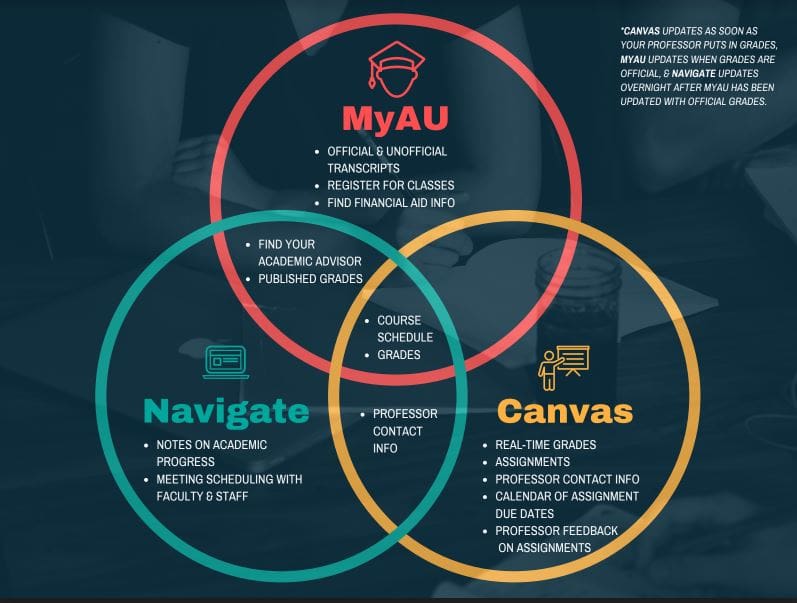
Yes. You can view your grades in Navigate, but for your official transcripts, you will need to log into MyAU. To view real-time updates on your grades and grades for each assignment, log into Canvas.
What do I do if I can’t log in?
Email navigate@avila.edu about your login issues and we can troubleshoot.
Can I read the notes that the faculty or staff member left after we have a meeting?
Yes and no. The faculty or staff member has the ability to make the notes private and just for them. So you may not be able to see all the notes from every meeting you’ve had.
How early in advance can I schedule a meeting with someone on campus?
12 hours is the standard for most offices. Some offices might be different depending on their availability.
What do I do if I’m trying to set up a meeting and there’s no availability?
Reach out directly to the person you are wanting to meet with to see if they have more days and times available.